
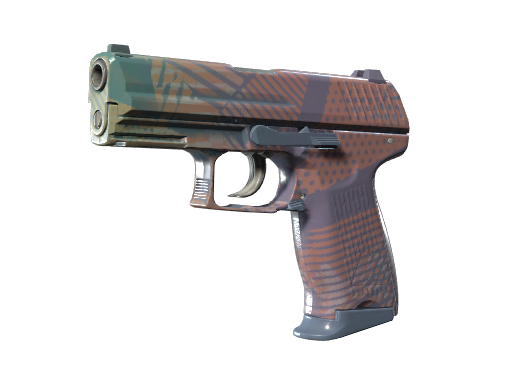
P2000 | Coral Halftone
Maximum float is 0.52.
Market Prices
Market prices are volatile and subject to rapid change. Verify current listings before buying inputs or executing a trade-up.
| Wear | Float Range | Normal Price | Volume |
|---|---|---|---|
| FN Factory New | 0.00 – 0.07 | €1.26 | — |
| MW Minimal Wear | 0.07 – 0.15 | €0.43 | — |
| FT Field-Tested | 0.15 – 0.38 | €0.25 | — |
| WW Well-Worn | 0.38 – 0.45 | €0.33 | — |
| BS Battle-Scarred | 0.45 – 1.00 | €0.25 | — |
Buy P2000 | Coral Halftone
Compare prices across marketplaces before buying.
* Affiliate link — TradeUpX may earn a commission at no extra cost to you.
Trade-Up Relevance
This skin can be used as <strong>input</strong> in Industrial Grade → Mil-Spec Grade trade-up contracts from the The Graphic Design Collection. Why it matters: In CS2 trade-ups, this skin's float range dictates the average float target required. If used as an input, its collection determines output odds. If targeted as an output, its profitability depends on the input cost and current market price.
Possible Outputs (Mil-Spec Grade)
Why Float, Rarity and Collection Matter for Trade-Ups
In CS2 trade-up contracts, the output skin's wear is determined by a mathematical formula using each input skin's float value and float range. Lower input floats produce better output conditions, which often means significantly higher output prices.
The collection determines which skins can appear as output, and the rarity determines the tier. Understanding these mechanics is the key to finding profitable contracts.
Float Value Details
Trade-Up Float Formula
adjusted_float = (input_float - 0.00) / (0.52 - 0.00)
When P2000 | Coral Halftone is used as a trade-up input, its float value is first normalized to the skin's specific float range (0.00 – 0.52). The adjusted float contributes to the average that determines output float.
Output Float Prediction
With 10× P2000 | Coral Halftone inputs at the same float, the output float for Mil-Spec Grade skins in the The Graphic Design Collection would be:
output_float = out_min + avg_adjusted_float × (out_max - out_min)